
1Gb Memory Card To 2Gb

Convert Your 1Gb Memory Card To 2Gb 


Procedure:
1) First of all we have to make sure that its a 1 GB memory card. This only works on 1GB And it supports only in some of the rare cases of memory cards.
2) Now Backup all your data in that because we have to format the drive.
3) After backing up now open the Skimedi Fix 2GB Capacity application. i will upload a link at the end of post.
4) A small window will pop up showing the FIX and Cancel option. And you have to browse the drive where it is located (generally G: or L: drive for USB sticks)
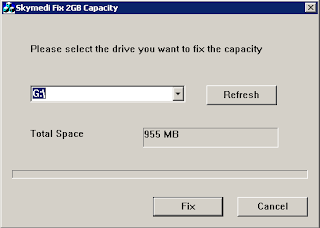


5) After selecting the drive press on FIX and then the updating process will be followed up. It will ask your conformation whether you agree to format or not. click on yes.
6) Later it will ask to replug the device. Just replug the memory stick card and put it back. The size of the memory will be increased from 1Gb to 2Gb. you can see the properties before and after the cracking process.
7) After that you can also check the memory size in phone and also you can test the size by copying all the data to it which is around 2Gb.
8) I personally tested this and now i have converted my 1Gb to 2Gb and using 1.8 space with no problem.


9) You can reopen the Skimedi Fix and select the drive again where it shows us the size as 1912mb which is nothing but 2Gb.
10) Some times we get a parameter error while copying the files which have crossed the 1Gb size so this may not be 100% successful.

http://www.mediafire.com/file/4fd7fouflu88bql/skimedi_fix.rar

Popular posts from this blog

Aston Windows Shell 2.0.3 (+ 61 windows skin + crack)

Gladiators Software announces the release of Aston version 2.x. This surprisingly smart, considered, at once sophisticated and simple shell replaces the standard Windows desktop and makes it more usable, beautiful and customizable. Many Windows users find standard shell too rigid and inflexible. Aston offers the completely unique approach with yet unseen features and themes with live wallpaper. The basic feature that makes it so unique is that Aston is fully skinnable and customizable. You can freely choose from many themes and pick the one that suits you the most. If you want to give your designing skills a try you can even make your own theme. The advanced skinning engine is very intuitive and your imagination is the only limit. Every element of the theme: menu, desktop, panels - can be tweaked and customized, thus letting one create the most convenient working area. Widgets push the limits of usability and customization even further. You want to know the weather forecast, your syste...

Windows Media Player 11 [No Activation Required]

Code: The latest iteration of Windows Media Player adds a lot of useful bells and whistles, succeeding in many ways as a competitor to iTunes for Windows. A tree-style file directory makes it easy to find the music you want quickly, and a simple search box gets you where you want to go immediately. A five-star rating system lets you rate your music, then organize it by rating, so it’s easy to group your favorite songs. Drag-and-drop functionality and a handy Create Playlist button take any confusion out of the process of making your own playlists. Creating the perfect mix CD is equally as easy–simply drag and drop songs into a Burn List in the right panel, then click Start Burn to finish. Ripping was reasonably fast on our test machine, and the program let us pick our preferred bit rate and audio file type. The biggest new feature in WMP11 is the ability to sign up with paid music and video services. Without registering, we were able to browse various sites and comp...

Real Desktop

Real Desktop is an application able to turn the user PC desktop in something similar to a real one (physical). This program asks the user if (s)he wants the current desktop icons sorted or unsorted, the very first time the application is started. Once it is running, the application shows 3D icons (same as existing ones) sitting on a virtual table (virtual desktop ) also presented in 3D. To run any of the programs that are related to the icons (links), it operates just like the regular Windows desktop: double click on one of them and the related program starts up. Now the icons are something 'physical', they can be rotated (mouse cursor on the icon corners), moved (mouse cursor on the middle area of the icon) and even 'lifted' by locating the mouse cursor on the middle area of the icon and then keep both mouse buttons pressed. When moving an icon , in this way it will 'kick' the other icons in its way and will push them away, unless the user uses the 'l...